RFC 2889
The RFC 2889 plugin benchmarks switches and other L2 devices using the RFC 2889 methodologies: throughput, frame loss, and forwarding rate with fully meshed and partially meshed traffic, the maximum forwarding rate, filtering of oversized frames, broadcast frame forwarding, MAC table capacity and address learning rate, and behavior under egress congestion (head-of-line blocking).
The plugin belongs to the Network Testing module (see Pricing) and is configured in the Data Plane: click Add plugin, find RFC 2889 in the catalog (Figure 21a), and open the RFC parameters section.
An RFC 2889 series works the same way as RFC 2544: a separate task with one client entry and one or more server entries, trials with automatic load selection, validation of every trial, and a dashboard on the Metrics tab. The differences are described below; the common parameters, the course of a series, and how to read the common panels are on the RFC 2544 page.
Test Setup
- Add an RFC 2889 client entry. Under Sources, select the transmitting interfaces and their networks.
- Add an RFC 2889 server entry (see RFC 2889 (server)) and select the receiving interfaces under Traffic recipients.
- Under Targets of the client entry, select the networks of the receiving ports.
- Configure the methodologies, frame sizes, and trials in the RFC parameters section of the client entry.
Traffic directions are built from the networks: every transmitting port sends to every port in the targets. One source and several targets give a one-to-many pattern; several sources and one target give a many-to-one pattern. The Transmit in both directions checkbox adds reverse streams; if every port is both a source and a target, the pattern is fully meshed.
The set of ports depends on the methodology:
| Methodologies | Ports |
|---|---|
| Throughput, frame loss, forwarding rate | 2 to 8 ports, directions from sources and targets; a port network can contain up to 256 addresses |
| Maximum forwarding rate (MFR) | One pair of ports, one direction. MFR can be selected together with throughput, frame loss, and forwarding rate, but then the whole series runs on one pair of ports and the Transmit in both directions checkbox is unavailable |
| Oversized frame filtering | One pair of ports, one direction; the methodology is selected on its own |
| Broadcast throughput and latency | One transmitting port; all other ports receive (in the targets) |
| MAC table capacity and learning rate | Three ports: the source (learning) port, the test port in the targets, and the monitoring port, a receiving port outside the targets |
| Congestion and HOL blocking | 2 or 4 transmitting ports and the same number of receiving ports in the targets. The ports form blocks of four: the first transmitting port sends to both outputs, the second only to the congested one; in each pair of targets, the first output is uncongested and the second is congested |
All methodologies except throughput, frame loss, and forwarding rate use a network with one address and one source port. Methodologies from different groups cannot be combined in one series: when you select a methodology from another group, the UI clears the incompatible ones.
The DUT floods broadcast frames to every port of the segment, including management ports and other equipment. Run the broadcast methodologies in a separate VLAN that contains only the tester ports.
Methodologies
| Methodology | What is measured | How it runs | Result |
|---|---|---|---|
| Zero-loss throughput | The highest load without loss for the selected traffic pattern | As in RFC 2544: a trial at the maximum load, then a binary search down to the Search resolution | Load in % of the port speed |
| Frame loss at varying load | Loss at different loads | From the maximum load downwards in steps of the Load reduction step, until two consecutive trials pass without loss | Loss in % at each load |
| Forwarding rate at load points | The rate at which the DUT forwards frames at each load | Trials at every step from the maximum load downwards with the reduction step | The highest forwarding rate, frames/s |
| Maximum forwarding rate (MFR) | The highest forwarding rate at loads above the throughput | After the throughput search, the load is raised by the Load increase step up to line rate | Maximum forwarding rate, frames/s |
| Oversized frame filtering | Whether the DUT drops frames larger than the allowed size | For each size: a control trial with 64-byte frames, a trial with frames of the tested size, and another 64-byte control trial | "Filtered" or "Forwarded by DUT" |
| Broadcast throughput | The highest broadcast load at which every receiving port gets all frames | A search as for throughput; frames are expected on every port in the targets | Load in % of the port speed |
| Latency of one broadcast frame | The delivery latency of a broadcast frame to each port | One frame per trial | Latency in µs per port |
| MAC table capacity | How many MAC addresses the DUT stores | The learning port sends frames from a set of MAC addresses to the test port, then the test port sends frames to these addresses. The set is learned if all verification frames arrive at the learning port and no frame is flooded to other ports, including the monitoring port. Binary search of the number of addresses | Number of addresses, "N MAC" |
| MAC address learning rate | How fast the DUT can learn addresses | Binary search of the learning rate for the Learning check addresses (no more than the capacity found) | Rate, "N frames/s" |
| Congestion and HOL blocking | Whether congestion of one output affects an uncongested output | Every transmitting port runs at 100%: the congested output receives 150% load, the uncongested one 50% | Loss on each output and the HOL blocking flag |
Parameters
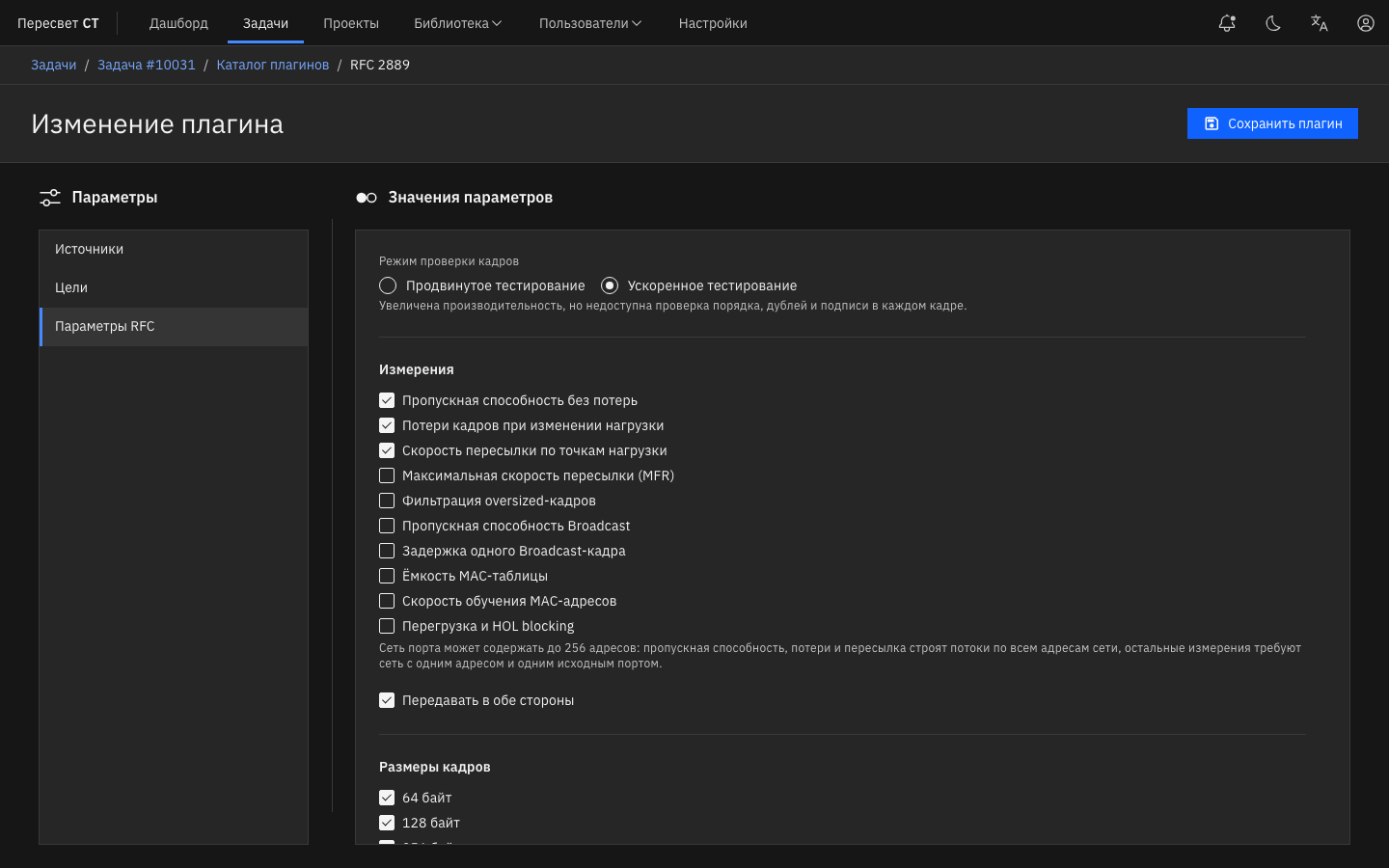
Figure 21o — Frame check mode and RFC 2889 measurements
The frame check mode, trial settings, and ports are the same as in RFC 2544. The differences:
- The preset frame sizes are 64–1518 bytes, and an additional size can be 64 to 1518 bytes. Oversized frame filtering uses the sizes 1519, 1522, 2048, 4096, and 9018 bytes (an additional size can be 1519 to 9018 bytes); the DUT must have the regular 1518-byte frame limit configured.
- For MFR, broadcast, congestion, and filtering, the trial duration is at most 300,000 ms.
- For MFR and congestion, the Maximum port load is 100%.
- Accelerated testing does not disable any RFC 2889 methodology. If hardware counting is unavailable on a receiving port, the CPU checks the frames on that port, and the report says so.
Maximum forwarding rate
| Parameter | Description | Value |
|---|---|---|
| Load increase step | How much to raise the load on each trial of the MFR search | 1 to 1,000,000,000 frames/s, default 1000 |
MAC addresses
For the MAC table methodologies, the Learning before measurement field is called MAC address announcement: the time frames are sent so that the DUT learns the MAC address of the test port.
| Parameter | Description | Value |
|---|---|---|
| First MAC of the range | The first unicast MAC address of the sequential test range | Default 02:00:01:00:00:00 |
| MAC aging time | The aging time of dynamic MAC addresses from the DUT settings. A trial must finish before the addresses age out | 1000 to 3,600,000 ms |
| Capacity upper bound | Upper limit of the capacity search | 1 to 1,000,000 addresses, default 4096 |
| Initial capacity trial | Number of addresses in the first capacity search trial | 1 to 1,000,000, default 256 |
| Learning check addresses | Number of addresses for the learning rate search within the known DUT capacity | 2 to 1,000,000, default 1024 |
| Initial learning rate | The constant learning rate in the capacity search and the starting rate in the learning rate search | 1 to 1,000,000 frames/s, default 50 |
| Learning rate limit | Upper limit of the learning rate search | 1 to 1,000,000 frames/s, default 100,000 |
| Address verification rate | Frame rate used to verify the learned addresses | 1 to 1,000,000 frames/s, default 1000 |
Results
On the Metrics tab, select the RFC 2889 dashboard. The Summary, Results, Traffic, Run parameters, Measurement details, and Latency sections work the same way as on the RFC 2544 dashboard (see RFC 2544 results). PDF, CSV, HTML, and JSON reports are exported from the Parameters menu (⋮).
Test results
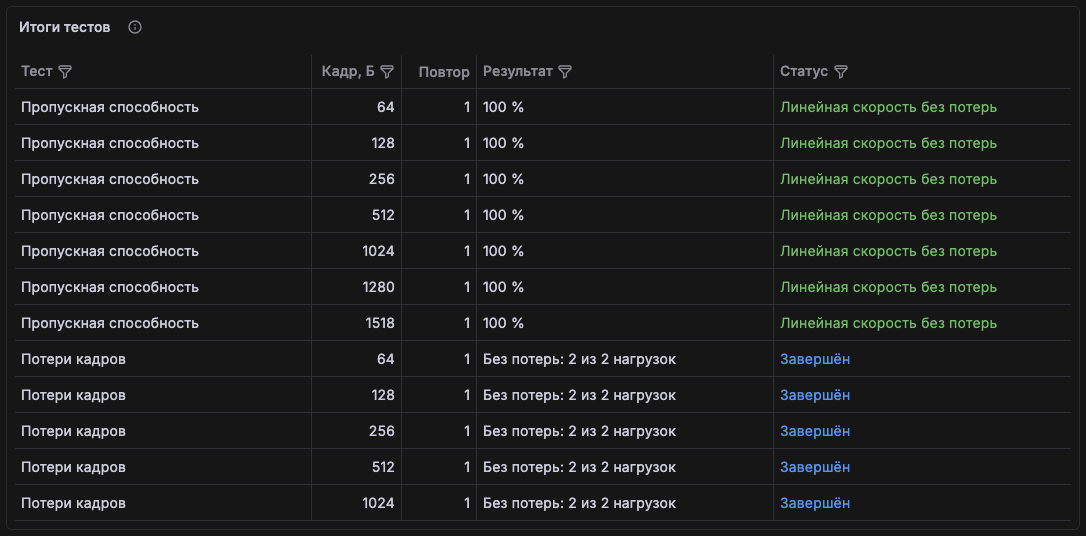
Figure 21p — Throughput and frame loss results
| Methodology | How to read the "Result" column |
|---|---|
| Throughput, broadcast throughput | Zero-loss load in %; "≥" means the maximum load below 100% was passed and the DUT limit was not found |
| Frame loss | "No loss: N of M loads" |
| Forwarding rate, maximum forwarding rate | The highest forwarding rate in frames per second |
| Oversized frame filtering | "Filtered": the DUT forwarded no oversized frame; "Forwarded by DUT": the frames passed through the DUT |
| MAC table capacity | "N MAC"; "≥" means the Capacity upper bound was passed, with the status "Configured upper bound passed — extend the range" |
| MAC table learning | "N frames/s"; "≥" means the Learning rate limit was passed |
| Broadcast latency | The mean value or the range of per-port means in µs |
| Congestion and HOL | "See congestion per direction": the result is in a separate table |
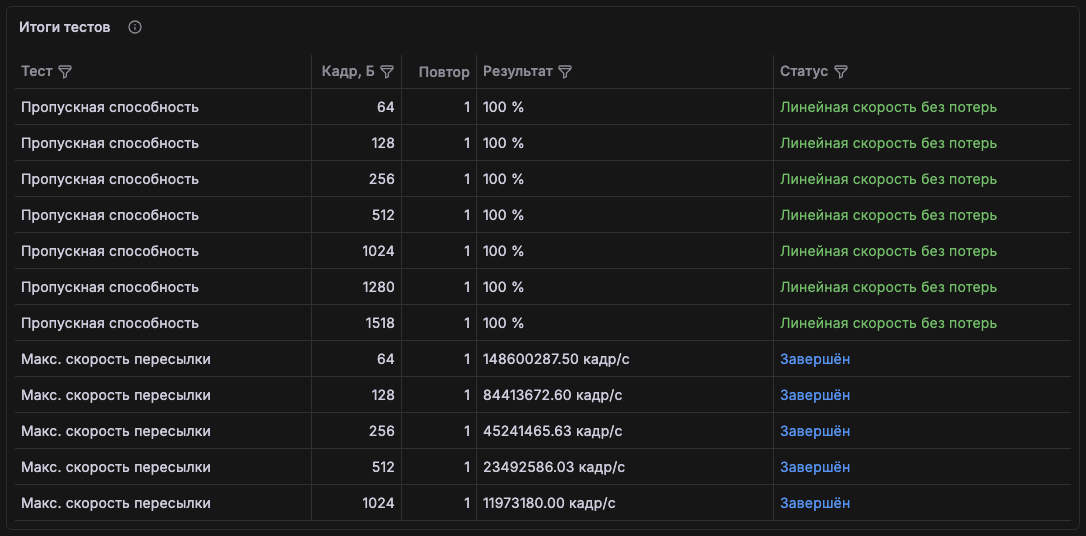
Figure 21q — Throughput and maximum forwarding rate on a pair of 100 Gbit/s ports
Compare the forwarding rate with the theoretical line rate for the frame size: for example, for a 100 Gbit/s port it is about 148.8 million frames/s with 64-byte frames and about 8.1 million frames/s with 1518-byte frames.
Throughput and broadcast
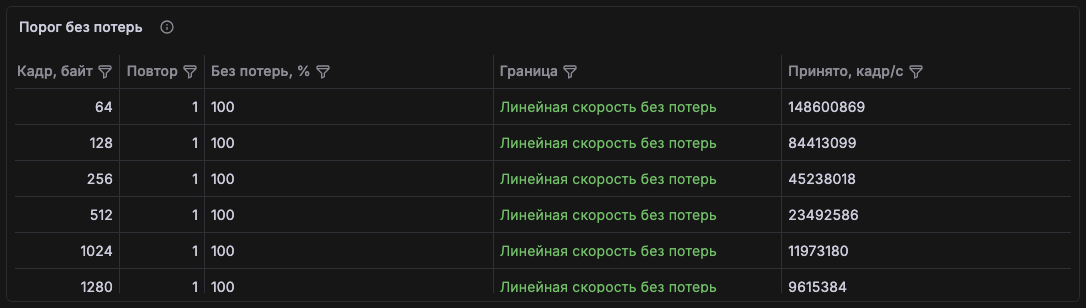
Figure 21r — The "Zero-loss threshold" table
- Zero-loss threshold: one row per frame size and repetition: throughput in %, the search bound ("Line rate without loss" if 100% was passed), and the receive rate in frames per second at the found threshold.
- Broadcast per port: for each broadcast trial and each receiving port: how many frames were expected, received, and lost. Broadcast is checked on every expected port, so the total reception can exceed the transmission.
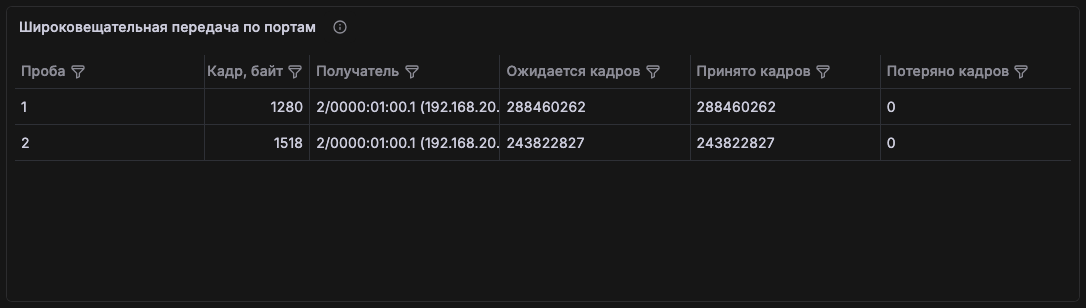
Figure 21s — 1280- and 1518-byte broadcast frames received without loss
MAC table, congestion, and filtering
- MAC table capacity and learning: the capacity found and its upper bound (the first failed trial), the learning rate and its upper bound, the number of MAC addresses in the set, and the status. The statuses "No successfully learned address found" and "No successful learning rate found" mean the DUT did not learn the addresses even in the smallest trial: check the MAC aging time and the MAC address announcement.
- Congestion per direction: for each block of ports: the output role (
uncongestedorcongested), transmitted and received frames, and loss in %. In the HOL column,truefor the uncongested output means HOL blocking: congestion of the neighboring output caused loss on the uncongested one. Loss on the congested output is expected; if there is none, the DUT handled the overload without loss. Missing required ports are not counted as a successful result. - Oversized frame filtering: for each size: transmitted and received oversized frames, the result, the numbers of the control trials before and after, and the status. The result is determined from the trial with oversized frames; the 64-byte control trials must pass without loss, otherwise filtering is not considered established.
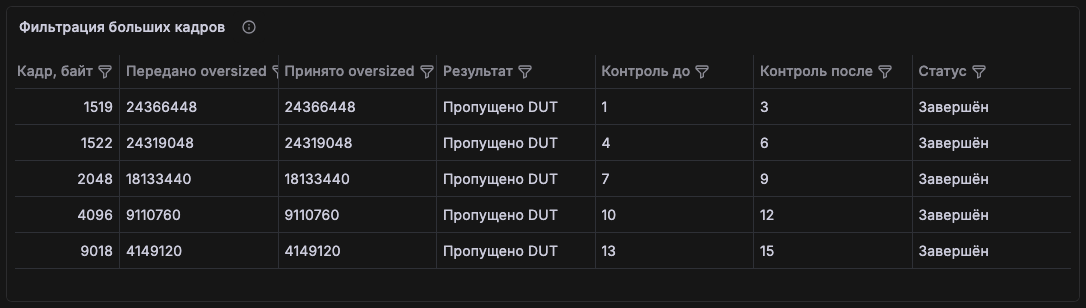
Figure 21t — 1519–9018-byte frames passed through a DUT with MTU 9214: the result is "Forwarded by DUT"
In Figure 21t, the DUT is configured for jumbo frames, so it forwards frames larger than 1518 bytes. To test filtering, set a 1518-byte frame limit on the DUT ports: the expected result is then "Filtered".