Network Vulnerabilities (CVE)
The Network Vulnerabilities (CVE) plugin replays network scenarios from the PTI library. Use it to test IDS/IPS, NGFW, WAF, NDR, and other detection systems. Run these scenarios only in an isolated test environment.
Before configuring a task, upload or update the database under Library → Network Vulnerabilities (PTI), or under Settings → Network Vulnerability Package (PTI), and synchronize the agents. CVE cards show the CVE ID, product, version, protocol, CVSS score, description, and available replay variants.
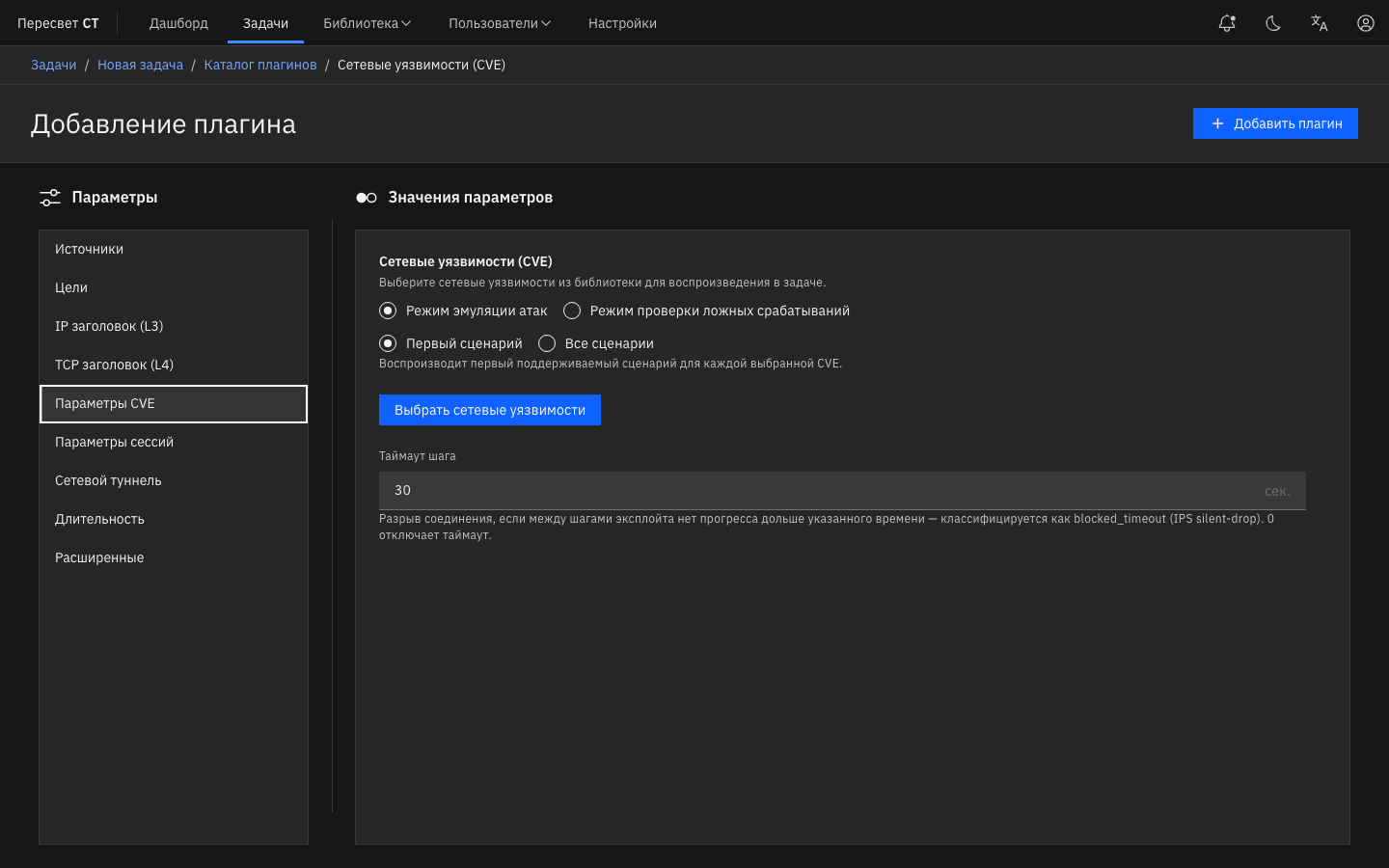
Figure 19 — Attack / FP mode and CVE selection in the constructor
Table 186 — CVE Replay settings in the constructor
| Name | Description | Value |
|---|---|---|
| Attack emulation mode / False-positive test mode | attack generates exploit traffic; false_positive generates legitimate traffic that resembles an attack to test IPS/IDS false positives | Changing the mode clears the selected CVEs |
| First scenario / All scenarios | Coverage: one supported scenario for each CVE or all scenarios for every CVE | Radio |
| Select network vulnerabilities | Selection dialog backed by the PTI library | Shows CVEs selected and Scenarios to run |
| Step timeout | Terminates the connection if the current step makes no progress for longer than the configured period; classified as blocked_timeout. 0 disables the limit | 0–300 seconds; default: 30 |
| Session settings / TLS / Duration / Tunnels | Common stateful tabs | Same as for other L7 plugins |
The plugin is available as both a client and a server for two-arm operation. The client replays the exploit/FP exchange; the server responds according to the scenario on the Peresvet ST side.
CVE dashboards by mode and coverage
The Metrics tab displays only the dashboard that matches the task's parameter combination:
| Dashboard in the UI | Key | Condition |
|---|---|---|
| Network Vulnerabilities (CVE) | cve_replay | Attack + first scenario |
| Network Vulnerabilities (CVE, all scenarios) | cve_replay_all | Attack + all scenarios |
| Network Vulnerabilities (CVE, FP mode) | cve_replay_fp | False positive + first scenario |
| Network Vulnerabilities (CVE, FP mode, all scenarios) | cve_replay_fp_all | False positive + all scenarios |
On attack dashboards, review the Passed / Blocked CVEs summary, the table of passed CVEs, and the client/server CVE Attempts panels. In FP mode, the same outcomes indicate whether the FP exchange completed or was interrupted.
Interpreting the result
CVE Replay uses the reverse polarity of Dynamic Applications:
| Outcome | Meaning in an IPS/NGFW test |
|---|---|
completed | The scenario reached the end (steps_done), meaning the exploit or exchange passed through the security device. In an IPS test, this is usually bad |
blocked_rst, blocked_syn, blocked_timeout, blocked_close, payload_mismatch | The scenario was interrupted or the expected response changed, meaning the security device or path prevented the original exchange from completing. In an IPS test, this is usually good |
blocked_orphan | Replay error or unclassified outcome; excluded from security effectiveness calculations |
Do not confuse a successful Peresvet ST scenario with successful protection. Base the final assessment on the selected CVE dashboard, DUT events, and task logs.
Does a failed TCP handshake count as blocked
Yes. A TCP session does not have to be established for an attempt to count as blocked. If the TCP handshake does not complete within the allotted time, the attempt receives the blocked_syn outcome, displayed as SYN drop, and counts toward blocked attempts. This label covers the entire connection establishment process: for example, the SYN may reach the server agent while the SYN/ACK never returns to the client.
Peresvet ST determines the outcome from the observed execution of the network scenario. A blocking outcome alone does not confirm that a specific IPS signature matched. Possible causes include filtering rules, SYN-flood protection, an inline device terminating the connection, or connectivity problems. To assess exploit detection and blocking specifically, correlate the result with the tested device's logs and packet captures from both sides. If the TCP connection was not established, the application exchange on that connection has not started.
Attempt outcomes (outcome)
Every attempt receives one outcome. On the CVE Attempts panels, the same values may be labeled Locally completed / RST / SYN drop / Timeout / Early close (FIN) / payload_mismatch / Replay error. In earlier versions, the Successful label also means completed: successful replay of the exchange, not successful blocking.
Table 187 — CVE Replay outcomes
| Outcome | When it is assigned | Interpretation |
|---|---|---|
completed | All scenario steps completed | The exchange was replayed to completion |
blocked_rst | An RST arrived before steps_done | The path or DUT explicitly terminated the connection, typically by blocking with RST |
blocked_syn | The TCP handshake timed out (SYN_TIMEOUT) | The connection was not established; the SYN or handshake was blocked or lost |
blocked_timeout | A step/UDP timeout fired, the TCP retry budget was exhausted, or the drain timeout expired | The path stopped advancing the current step without sending an explicit RST or FIN |
blocked_close | A FIN arrived or the TCP connection explicitly closed before steps_done | The remote endpoint or an inline device terminated the connection before the scenario completed |
payload_mismatch | Received application bytes differ from the expected response | An inline device replaced the response, or the responder returned different content |
blocked_orphan | The attempt could not be assigned to one of the network outcomes above | Replay error or unclassified internal state; this value should be zero in a healthy task |
Timeout, early close, and replay errors
Do not merge these outcomes:
blocked_timeoutis an explicit step, UDP-response, TCP-retransmission, or final-drain timeout. It is a network outcome and counts as blocked.blocked_closeis an early FIN/close before every step completes. For example, a TLS proxy can accept the client-side TCP leg and close it without forwarding the request to the server agent. It is a network outcome and counts as blocked.blocked_orphanis not a network verdict. It is a replay error or an unclassified state. The dashboard reports it separately and excludes it from the block rate.
If blocked_orphan is greater than zero, inspect the task logs and repeat the test after correcting the cause. Do not count those attempts as blocked or allowed.
Using the dashboards
- Attack mode: an increase in
completed/ Passed CVEs identifies scenarios allowed through by the security device. Classified blocking outcomes identify scenarios that did not complete or received a modified response.blocked_orphanis reported separately as a replay error. - CVE Attempts: breaks outcomes down by cause (
blocked_rst,blocked_syn,blocked_timeout,blocked_close,payload_mismatch,blocked_orphan) on the client and server sides. - FP mode:
completedmeans the legitimate FP exchange completed; a classified blocking outcome may indicate a false positive or a broken path. Interpret this together with the DUT policy. - Correlate outcomes with DUT logs and events and, when necessary, with packet captures (PCAP) on the agents. An RST appears as
blocked_rst, a silent drop asblocked_timeout, and an early FIN asblocked_close.
Finding the IP addresses and ports of a specific connection
CVE Attempts shows why attempts ended, but CVE Replay events currently do not store src ip, src port, dst ip, or dst port. To inspect a specific connection, use a PCAP recorded while the task was running:
- Before starting the task, open Packet Capture, enable Activate at Task Start, and set a recording size that covers the required part of the test.
- Run the test and download PCAP files from the client and server agents. During execution, use Participating Agents → Request Capture; after completion, the files are available under Browse Files.
- Open the PCAP in Wireshark or another analyzer. Inspect the source and destination addresses and ports in the IP and TCP/UDP headers. Even if the TCP connection was never established, these four fields are available in the initial SYN packet, provided it was captured.
- Compare the exchange on both sides: whether the SYN reached the server agent, whether the SYN/ACK returned, whether an RST or FIN appeared, and at which step data transfer stopped. Correlate the addresses, ports, and packet timestamps with the tested device's logs.
Use the actual values from the capture: NAT or proxying can change the addresses and ports between the two sides. A capture retains a limited window of packets, so an early attempt may have been overwritten by the end of a long test. If the required exchange is missing from the PCAP, repeat the test with capture enabled and an appropriate size limit. When testing many CVEs, running the CVE of interest separately can make analysis easier.
See Traffic Capture for instructions on enabling capture, downloading files, and choosing a recording size.